
FedEx Mobile
FedExBusiness
3.736.45K Reviews
- Version
- 9.33.0
- Installs
- 10.00M
- Age Rating
- Everyone
Screenshots
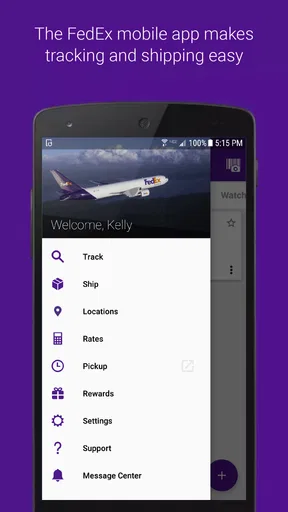
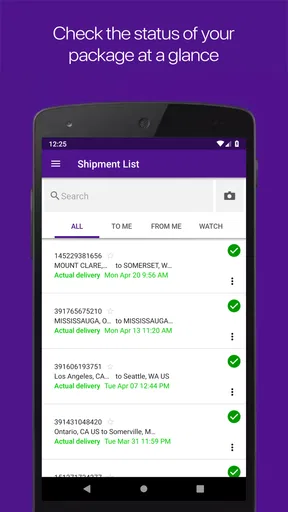
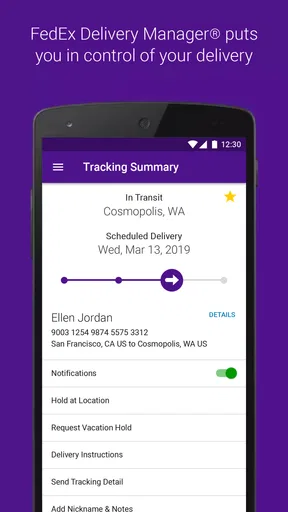
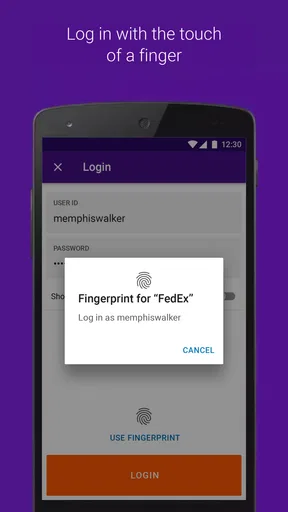
Our Review of FedEx Mobile
 Analysis by Appyee
I find that delivery tracking works best when it fits into a routine instead of becoming a reason to check a phone every few minutes. I tried FedEx Mobile with that in mind: as a business app from FedEx, it gives you a place to follow shipments and handle some shipping tasks while away from a computer. Its appeal is straightforward, but it is most useful when your deliveries already involve FedEx and you want fewer scattered tracking details.
Start with a calmer shipping workflow
Before using a tracking app, it is easy to let shipment information pile up in order confirmations, email threads, and saved notes. That arrangement can work for the occasional parcel, but it becomes annoying when several deliveries are moving at once or when you need to check a status quickly while out. I see this app as a practical hub for the FedEx part of that routine, rather than a replacement for every shipping tool or inbox.
The useful change is not that tracking makes a parcel arrive sooner; it is that a dedicated place can make it easier to answer a simple question: what is happening with this shipment? For a small business owner coordinating outgoing parcels, that can mean checking progress between errands rather than returning to a desk. For someone waiting on a personal delivery, it can reduce the need to search through messages for a tracking number.
A sustainable routine also means resisting the urge to turn every status change into a task. I would check when I have a practical reason—such as planning to be home or deciding whether to contact a recipient—rather than repeatedly opening the app for reassurance. That distinction matters: tracking is most valuable when it helps you make a decision, not when it feeds a cycle of refreshing.
Capture shipment details where they arise
The app’s shipment management and barcode scanning are useful in different moments. Scanning is handy when a tracking barcode is already in front of you and typing a long number would be fiddly. It can also be a better way to retrieve shipment information while handling a label or parcel, particularly when you are away from your usual computer. I would still keep important order or customer records in the system where I normally manage them; a tracking app is a convenient view, not a full business filing cabinet.
For a repeat sender, the phone-based shipment tools can help bridge the gap between preparing a parcel and getting back to other work. A sensible sequence is to gather the recipient and parcel details before starting, complete the task in one sitting, and then use tracking to follow the shipment. That keeps the phone from becoming a place where half-finished logistics tasks are scattered across several sessions.
There is a trade-off in keeping everything in one carrier’s app. If a delivery is handled by FedEx, a carrier-specific view can be more direct than a general tracking service. If your household or business regularly receives parcels from several carriers, though, you may still need another place to see the whole picture. I would not expect one carrier app to organize shipments that belong to other delivery companies.
Using FedEx Mobile as part of the routine
I find that a shipping app earns its place when it supports a dependable habit rather than inviting me to check every status update. In this section, I’d focus on choosing a regular moment to review FedEx shipments and deciding in advance what would actually require action. That makes the routine easier to keep, and it sets up a closer look at how to make those check-ins useful.
Build a repeatable check-in
A routine that works for me is to look at shipment progress at a natural pause in the day, then decide whether any action is needed. If I am expecting a delivery while away, I can check its status before changing plans. If I am sending a parcel for work, I can check progress when I am already reviewing orders or customer messages, rather than interrupting every task for an alert.
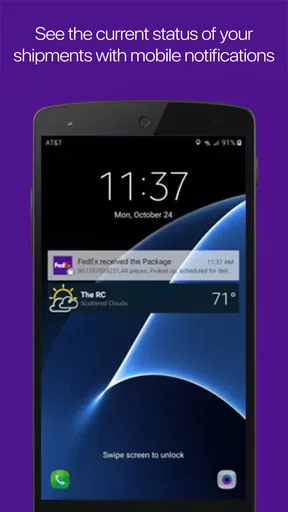
Notifications can support that routine by bringing shipment changes to your attention, but they are not automatically helpful just because they are available. I would enable only the alerts that genuinely affect what I need to do, and review whether they are useful after using the app for a while. That is a small but important productivity choice: fewer interruptions can make tracking easier to live with, especially when several shipments are active.
For example, imagine a small seller dropping off a customer order before heading to a meeting. They can use the phone to manage the shipment, keep its tracking information accessible, and check progress at a planned break. If a customer asks where the parcel is, the seller has a more direct way to review the shipment than searching through old messages. The app does not remove the need to communicate clearly or maintain order records, but it can make the delivery part of that workflow less cumbersome.
Where it fits among tracking options
Compared with checking carrier updates through a browser, a mobile app is naturally better suited to quick checks while away from a desk and to handling shipment details on a phone. Compared with a multi-carrier tracking service, this one has a narrower focus: it is for FedEx shipments and related tasks, not a universal dashboard. I would choose based on the mix of deliveries I actually manage, rather than assuming one approach is best for everyone.
If most of your parcels are handled by FedEx, having tracking and shipping tools together can reduce the steps between finding a shipment and acting on it. If your deliveries are spread across carriers, a broader tracking service may be a better first stop for an overall view, with FedEx Mobile reserved for FedEx-specific tasks. And if you only receive a parcel now and then, the tracking page or message you already have may be enough; installing an app is not automatically an improvement.
The app is free, rated for Everyone, and has an average rating of 4.0 from around 289,000 ratings, with over 10 million installs. That scale makes it a familiar option for many users, though popularity does not guarantee that its workflow will suit yours. I would judge it by whether it saves me time on the shipments I personally need to track.
What can interrupt an otherwise simple workflow
The main limitation is its carrier-specific scope. If you want every household delivery or business shipment in one place, you will need another method for parcels outside FedEx. Even within a FedEx-focused routine, the app is not a substitute for the records you use to manage sales, customer conversations, or accounting. Keeping those responsibilities separate helps avoid treating a tracking screen as a complete view of an order.
There is also a practical difference between an alert and a guarantee. A notification can make it easier to notice a change, but it cannot make a delivery schedule certain or remove the need to check details when timing matters. If a parcel is important enough that someone must be available to receive it, I would use the tracking information as one input in planning, not as the only basis for a fixed commitment.
Some people may also prefer a browser or email because those are already part of their routine. That is a reasonable choice for occasional tracking, especially if installing another app would add clutter. The phone app earns its place when the convenience of keeping FedEx shipment tasks close at hand outweighs the effort of maintaining another tool.
Getting started and deciding whether it belongs on your phone
Setting up FedEx Mobile was a breeze. All you need is your FedEx account credentials, and you're in. The interface is pretty intuitive, which means you won't need a tutorial to find your way around. The home screen presents a neat dashboard showing all your shipments in one place, which I found super handy. No more toggling between emails for tracking numbers!
One of the best parts of the app is real-time tracking. You can literally see where your package is on the map. This feature alone is a stress reliever for someone like me who's always worried about lost packages. Another nifty feature is push notifications. You get alerts about every stage of your shipment—from when it leaves the warehouse to when it's at your doorstep.
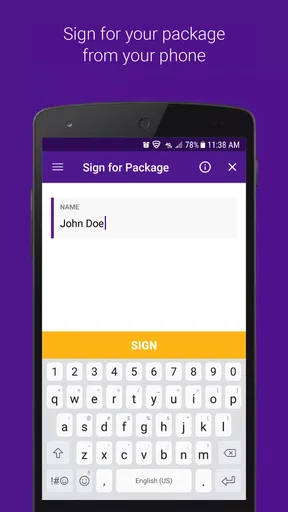
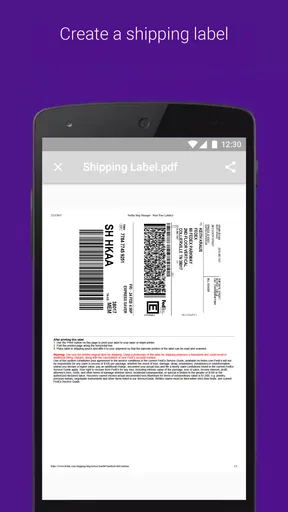
And if you’re like me and hate printing out labels, the app has a solution. You can create and manage shipments directly from your phone. It even lets you use your phone’s camera to scan barcodes for quick access to tracking information. Talk about convenience!
Design, version, and day-to-day feel
The design is clean and modern, with a user-friendly layout. Everything is just a tap away. I appreciated the color-coded statuses which make it super easy to know the status of your shipments at a glance. The app also supports multiple languages, which is great for global users.
One thing I noticed was that the app is pretty light on resources. It didn't drain my battery or hog my data, which is a big win in my book. The performance was smooth, with no noticeable lags or crashes during my use.
The current version is 9.27.1, and it has been available since November 22, 2011. I would still check that my phone meets its minimum operating-system requirement of version 11 before installing. For anyone updating an existing setup, the practical question is whether the current app works comfortably on their device and fits the way they already handle shipments, rather than the version number itself.
Who I would recommend it to
I would recommend it most to people who repeatedly ship with FedEx or regularly wait for FedEx deliveries and want to manage those moments from a phone. That includes a small business owner who needs to keep outgoing parcels visible between other tasks, as well as a frequent online shopper who wants a quick way to check a delivery without hunting through email. Its business category makes sense for those practical shipping routines, even though personal recipients can find it useful too.
I would skip it if you rarely deal with FedEx, strongly prefer not to install carrier-specific apps, or need a single view that covers many delivery companies. A general tracking approach may suit a mixed-carrier household better, while email or a browser may be perfectly adequate for one occasional parcel. The best choice depends on how often you need the information and whether the app reduces friction instead of adding another place to look.
So, is FedEx Mobile worth downloading? Absolutely! It makes managing your shipments straightforward and hassle-free. Whether you’re a casual shopper waiting for your latest online purchase or a small business owner juggling multiple deliveries, this app gets the job done efficiently.
Give it a try, and you might just find yourself wondering how you ever managed without it. Oh, and next time you're anxiously awaiting that package, just sit back and relax—FedEx Mobile's got your back.
Privacy and Permissions
See what permissions an app requests and how it handles your data.
- Identity
- find accounts on the device, add or remove accounts
- Calendar
- read calendar events plus confidential information, add or modify calendar events and send email to guests without owners' knowledge
- Contacts
- find accounts on the device, read your contacts
- Location
- approximate location (network-based), precise location (GPS and network-based)
- Photos/Media/Files
- read the contents of your USB storage, modify or delete the contents of your USB storage
- Storage
- read the contents of your USB storage, modify or delete the contents of your USB storage
- Camera
- take pictures and videos
- Microphone
- record audio
- Wi-Fi connection information
- view Wi-Fi connections
- Other
- view network connections, create accounts and set passwords, change network connectivity, full network access, close other apps, use accounts on the device, control vibration, prevent device from sleeping, read Google service configuration
Verdict
Strengths of FedEx Mobile
- Real-time package tracking updates.
- Easy access to delivery history.
- User-friendly interface design.
- Push notifications for delivery status.
- Secure login with biometric options.
Limitations of FedEx Mobile
- Limited functionality for international shipping.
- Occasional app crashes reported.
- No dark mode option available.
- Requires frequent updates for optimal use.
- Limited customization of notification settings.
Similar Picks in This Category
View All
LinkedIn: Community & Network
LinkedIn3.8

Zoom Workplace
zoom.com4.1

Microsoft Teams
Microsoft Corporation4.6

Meta Business Suite
Meta Platforms, Inc.4.6

Webex Meetings
Cisco Systems, Inc.4.5

TeamViewer Remote Control
TeamViewer4.4
Frequently Asked Questions
What features does the FedEx Mobile app offer?
The FedEx Mobile app provides a variety of features that enhance the shipping and tracking experience. Users can track shipments in real-time, receive delivery notifications, create shipping labels, and find FedEx locations nearby. The app also offers the convenience of managing your deliveries and holds for pickup directly from your mobile device.
How can I track my package using the FedEx Mobile app?
Tracking a package with the FedEx Mobile app is straightforward. Simply enter the tracking number in the app to receive real-time updates on your shipment's status. The app provides detailed tracking information, including estimated delivery times and any potential delays, ensuring you stay informed every step of the way.
Is the FedEx Mobile app secure for managing shipments?
Yes, the FedEx Mobile app is designed with security in mind. It uses advanced encryption to protect your data and ensures that your shipping and personal information remain confidential. Regular updates and security patches are also implemented to maintain a high level of security for all users.
Can I schedule pickups through the FedEx Mobile app?
Yes, the FedEx Mobile app allows users to schedule pickups directly from their device. Simply choose a convenient time and location, and a FedEx courier will come to collect your package. This feature is designed to simplify the shipping process and provide flexibility for users with busy schedules.
What devices are compatible with the FedEx Mobile app?
The FedEx Mobile app is compatible with most Android and iOS devices. It supports a wide range of smartphones and tablets, ensuring that users can access features and manage their shipments on-the-go. Make sure your device meets the minimum operating system requirements for optimal performance.
